A PMO that runs on status decks is always reporting on last week. Someone chases project managers for updates, someone else reconciles spreadsheets, and by the time the portfolio review happens the numbers have moved. The meeting becomes a debate about whether the data is right instead of a decision about what to do.
monday.com is well suited to fixing this because the work and the reporting live in the same place. This post is a practical blueprint for building a PMO that sees its portfolio in real time — what to standardize, how to connect it, and where AI genuinely helps.
What "real-time" actually means for a PMO
Real-time doesn't mean a screen that refreshes. It means the answer to "what is on track, what is blocked, what is at risk, and where are we stretched?" is always available and always derived from the work itself, not from a report someone wrote.
monday.com supports this by connecting project boards, portfolio dashboards, timelines, Gantt charts, workload views, approvals and automations in one platform. The tool isn't the hard part. The hard part is the design decisions you make before you open a dashboard builder.
Step 1: Standardize your project template
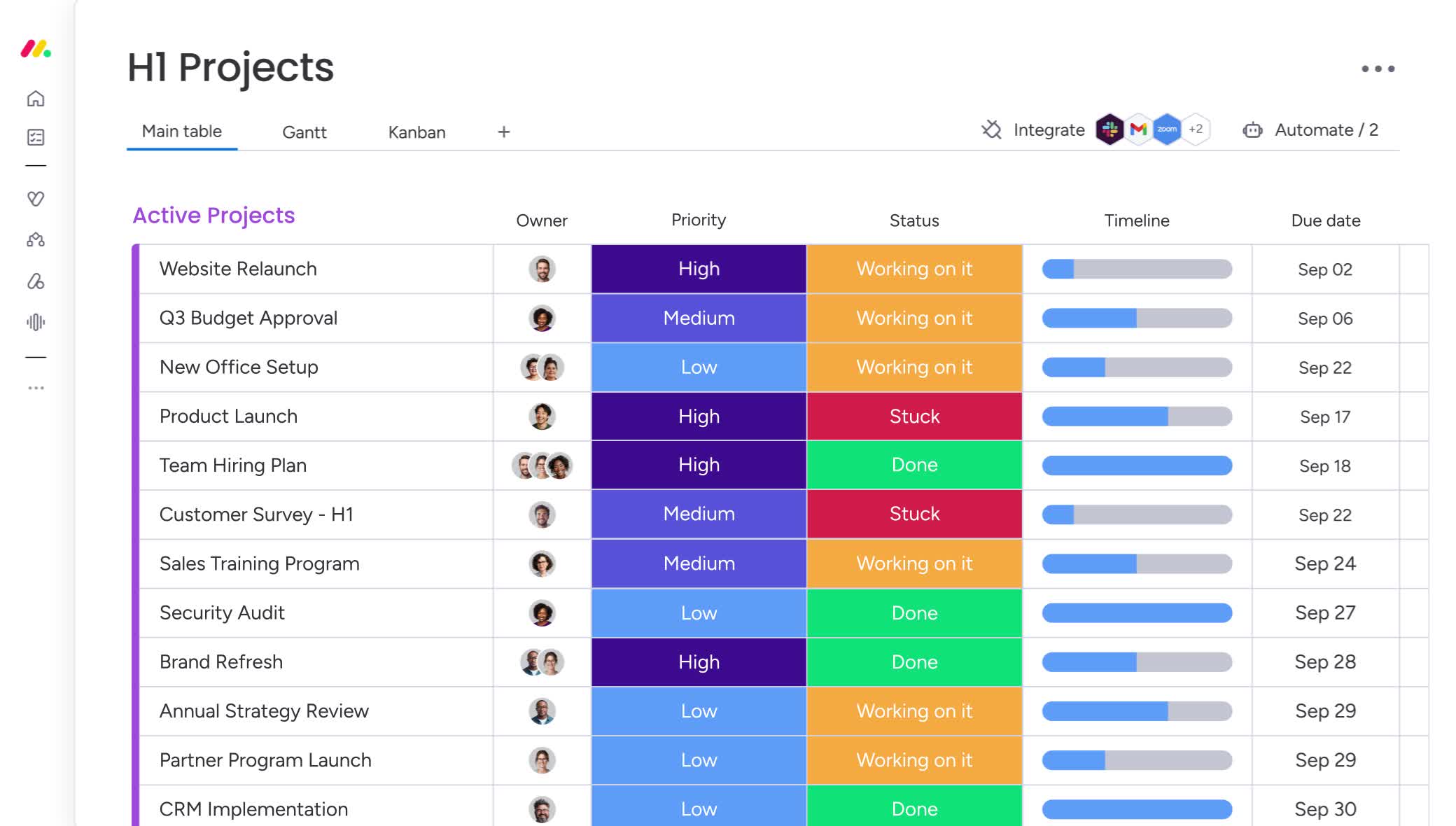
Every project board should start from the same template. A portfolio view is only as good as the consistency underneath it, so agree on a small set of fields every project uses:
- Status and health, using the same labels everywhere (for example On track, At risk, Off track)
- Owner, so every item has one accountable person
- Timeline with start and end dates
- Priority
- Budget and, where relevant, effort or capacity
Keep the list short. A template with 40 columns will not be filled in; one with eight will.
Step 2: Create one portfolio board
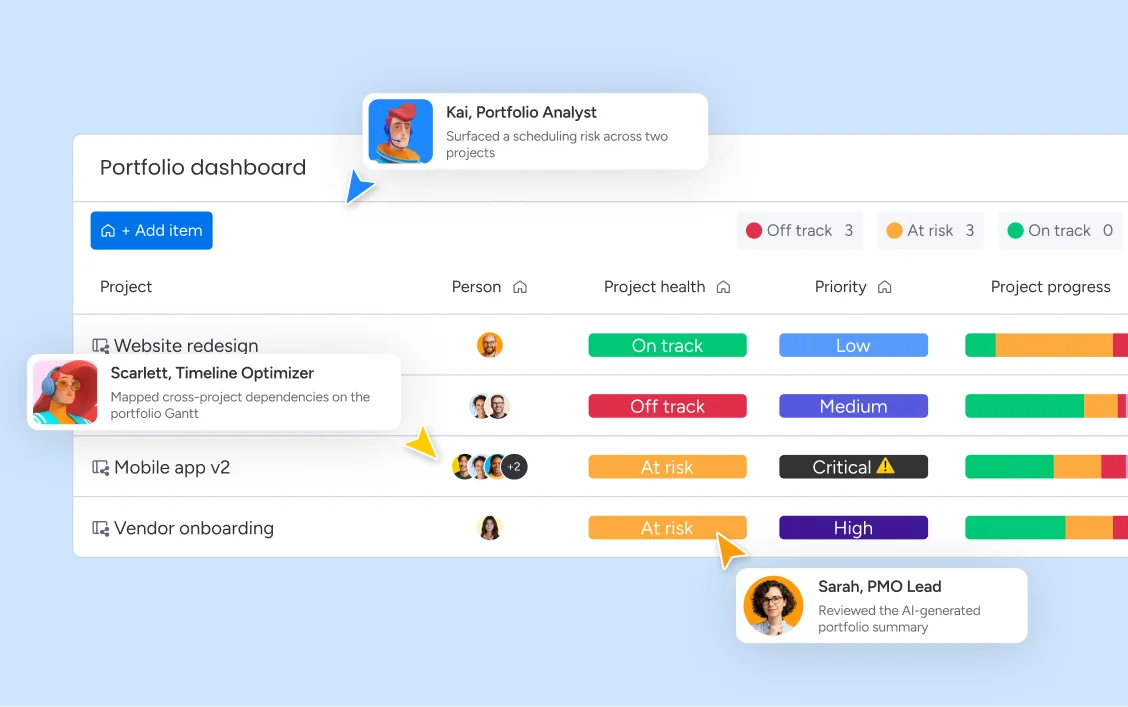
A high-level portfolio board connects to the more granular project views, so project managers keep working in their own boards while leaders see performance, timelines and budgets at a glance from one place. This is the single source of truth: it is fed by the work, not edited by hand.
Give the portfolio board the same discipline as the project template — one row per project, a small number of roll-up fields, and clear ownership of the board itself.
Step 3: Build dashboards for each audience
Different people need different answers, and a single dashboard that tries to serve everyone serves no one.
| Audience | What they need to know | Typical views |
|---|---|---|
| Executives | Is the portfolio healthy? Are we on budget and aligned to strategy? | Portfolio health, budget pacing, milestone status |
| PMO leads | Where are the risks and dependencies across projects? | Risk levels, cross-project Gantt, resource allocation |
| Project managers | What needs my attention this week? | Their own board, workload, upcoming deadlines |
| Resource managers | Who is over- or under-allocated? | Workload and capacity views |
Dashboard widgets such as counters, charts and battery-style progress indicators work well for summary figures. Keep each dashboard focused on one set of decisions.
Step 4: Make dependencies and the critical path visible
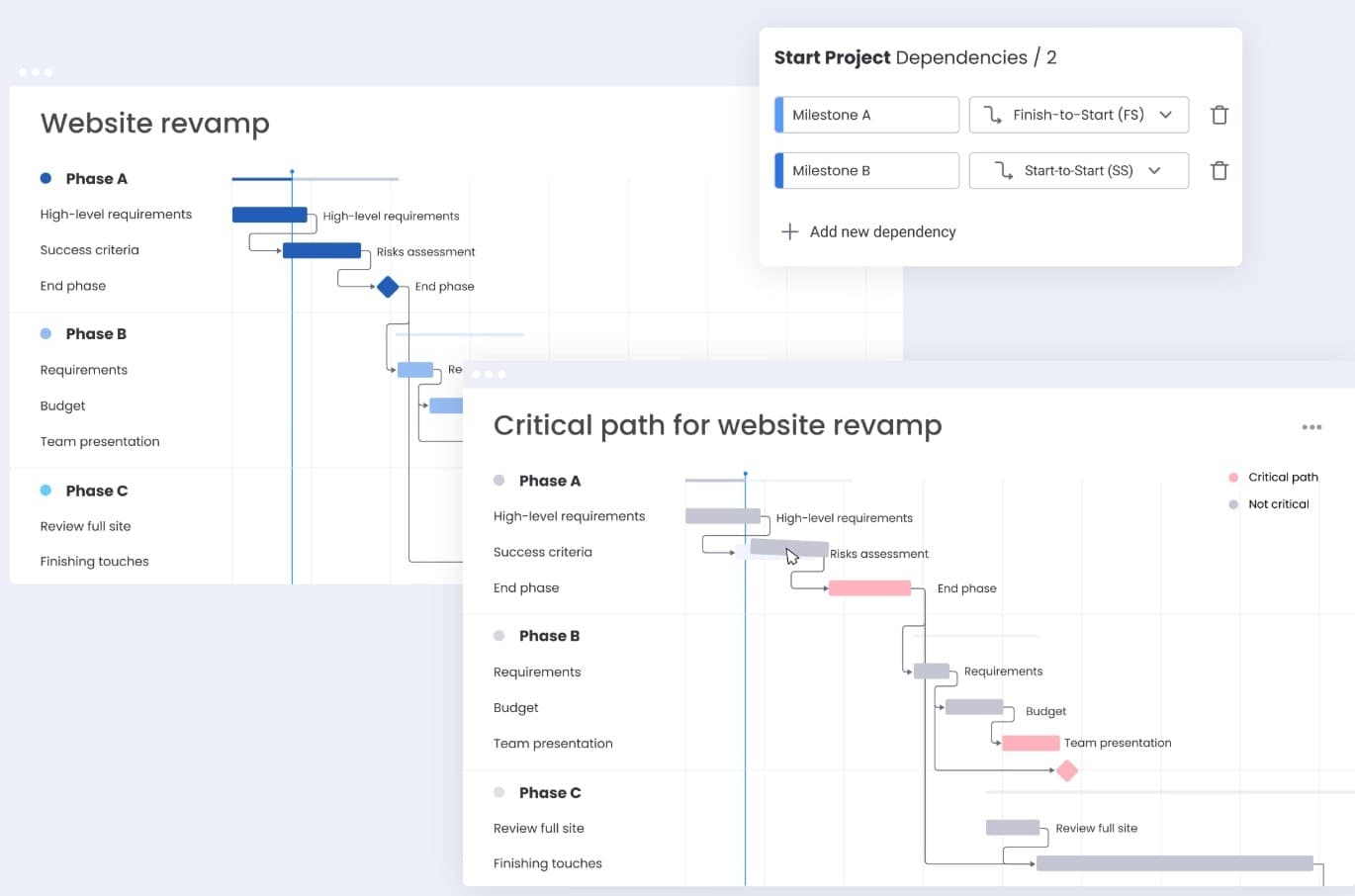
A portfolio view shows that something is at risk. A portfolio-level Gantt view shows why: how initiatives interconnect, where dependencies create scheduling risk, and which workstreams need attention now.
In monday.com you can set dependencies between tasks and milestones — for example finish-to-start or start-to-start — and highlight the critical path so you can see how a change in one place ripples across the timeline.
Step 5: Add resource and workload views
Most portfolio problems are really capacity problems. Workload and resource views show how your people's time is allocated across every project, so you can rebalance before a team burns out or a deadline slips, instead of discovering it afterwards. Make workload part of your regular portfolio review rather than a special exercise.
Step 6: Automate intake, approvals and routine updates
A PMO spends a surprising amount of time on administration. No-code automations can create tasks, send notifications, update statuses and hand work between teams, and approvals can formalize how new initiatives enter the portfolio. Automate the repetitive parts of intake and reporting first, and keep human judgment for prioritization.
Step 7: Layer in AI — carefully
Once the foundations are trustworthy, AI can reduce the manual work further. monday.com describes a Portfolio Health Dashboard that gives leaders a live view across every active project, an AI risk analyzer that scans timelines, dependencies and workloads for at-risk tasks and conflicts, and agents that generate and distribute status reports on a schedule.
A few rules keep this safe:
- Start with reporting and risk flagging, where the output is easy to check.
- Define permissions. Decide exactly what an agent may read, create or edit.
- Keep a human in the loop for anything that changes plans or commitments.
- Watch the cost. AI usage is metered, so track it per team from the start.
A rollout checklist
- Agree the template fields and status definitions with project managers.
- Migrate or recreate active projects on the template.
- Build the portfolio board and connect it to project boards.
- Build one dashboard per audience, and retire the old status deck.
- Add dependencies and workload views to the review cadence.
- Introduce automation, then AI, once the data is trusted.
- Review the model quarterly and trim anything nobody uses.
Common pitfalls
- Too many fields. If updating a project takes more than a couple of minutes, updates stop happening.
- Different definitions of "at risk". Write them down, with thresholds, before anyone builds a dashboard.
- Dashboards before data. A beautiful view of inconsistent data is worse than a plain one of reliable data.
- No owner for the portfolio itself. Someone has to own the template, the board and the review cadence.